UPPSC APO Prelims admit card 2026 released at uppsc.up.nic.in: Direct link to download hall ticket here

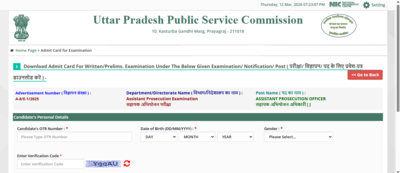
The Uttar Pradesh Public Service Commission (UPPSC) has released the admit card for the Assistant Prosecution Officer (APO) Preliminary examination 2026. Candidates who have registered for the recruitment exam can now download their hall tickets from the official website, UPPSC official website.The admit cards were issued today, March 12, 2026 under Advertisement no. A-8/E-1/2025. Candidates must log in using their One Time Registration (OTR) number and date of birth to download the admit card.The UPPSC APO preliminary examination will be conducted on March 22, 2026. The exam will be held in a single shift from 9:00 am to 11:30 am.
UPPSC APO Prelims 2026 : Exam centres and entry rules
The examination will take place in eight districts of Uttar Pradesh. These include Aligarh, Bareilly, Gorakhpur, Kanpur Nagar, Lucknow, Meerut, Prayagraj, and Varanasi.Candidates will be allowed to enter the examination centre one hour and thirty minutes before the exam begins. Entry will be closed 45 minutes before the scheduled start time.Candidates must carry the following documents to the exam centre:
- A printed copy of the admit card
- Two passport size photographs
- One original identity proof and its photocopy
Candidates will not be allowed to enter the exam centre without these documents.
UPPSC APO recruitment 2025: Selection process
The recruitment process includes three stages:
- Preliminary examination
- Main examination
- Interview
Only candidates who qualify in the preliminary examination will be allowed to appear for the next stage. Through this recruitment drive, UPPSC aims to fill 182 Assistant Prosecution Officer posts.
UPPSC APO Prelims admit card 2026: Steps to download
Candidates can follow these steps to download their admit card:
- Visit the official website uppsc.up.nic.in
- On the homepage, click on Candidate Corner then download admit card
- Click on the UP APO admit card 2026 download link
- Enter your login details such as OTR number and date of birth
- Download the admit card and take a printout for the examination day
Direct link here.Candidates are advised to carefully read the exam day instructions mentioned on the admit card and follow them during the examination. For further updates, candidates should keep checking the UPPSC official website.